


Star Tracker - Mobile Sky Map
4.513.92K Reviews
App Specs
- Version
- Varies with Device
- Updated On
- License
- Free
- Downloads
- 10,000,000+
- Developer
- PYOPYO Studio
- Categories
- Education
- Platform
- Android, iOS
Screenshots
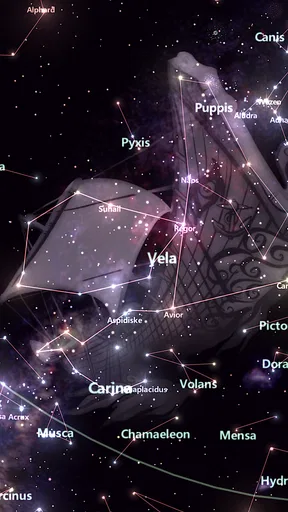
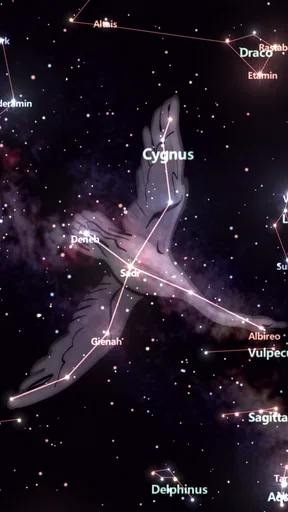
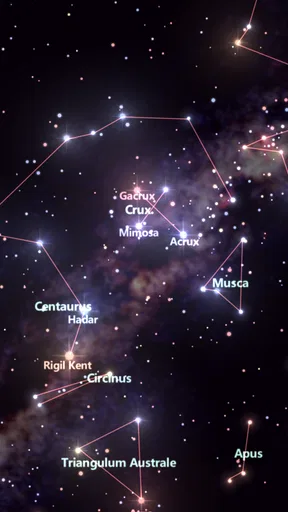
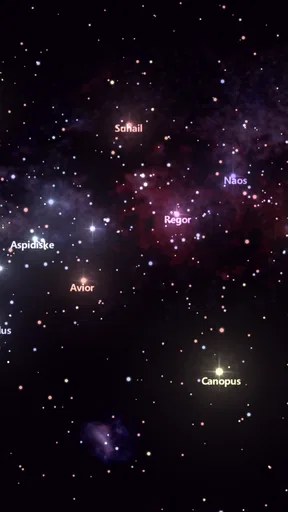
 Analysis by AppCompare
I like sky-map apps most when they help me answer a simple question without turning a quiet evening into a technical project: what am I looking at? That makes Star Tracker - Mobile Sky Map appealing to curious beginners, families, and anyone who wants a more informed look at the night sky. It is an education app from PYOPYO Studio, and its broad appeal is reflected in an average rating of 4.6 from around 81,000 ratings, with more than 10 million installs. Those figures suggest a well-used option, though they don’t tell you whether its approach suits your eyesight, phone, or observing conditions.
How the sky map feels to use
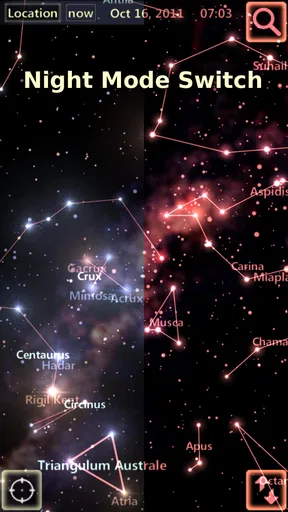
The dark presentation makes sense outdoors, where a bright screen can feel jarring and make it harder to keep your eyes adjusted to the darkness. I find the basic idea particularly useful when I’m with someone who knows a few familiar constellations but wants help identifying what lies between them. Rather than starting with a chart full of unfamiliar labels, you can look up and use the phone as a visual reference. Tapping an object for more information also gives a natural next step: identify first, then explore at your own pace.
There is a trade-off in that directness. A phone display can crowd the view with labels or become difficult to interpret if you’re holding it at an awkward angle, and on-screen text is not a substitute for adjustable text size or a dedicated accessibility setting. If you rely on magnification, have low vision, or find dense visual layouts tiring, try the app in comfortable lighting before planning a long session. The dark theme is a helpful consideration, but it does not by itself make every element easy for every reader.
Different bodies, different observing conditions
Pointing a phone toward the sky is a simple interaction, but it still asks you to hold and orient a device while looking between the display and the real sky. That can be tiring for someone with limited arm movement, tremor, pain, or difficulty coordinating a phone’s direction. I would use a stable surface or take turns holding the phone rather than assume that continuous hand-held aiming will suit everyone. A companion can also read object details aloud, turning the app into a shared activity instead of a solo screen task.
For sensory comfort, the night-friendly appearance is a sensible starting point, but screen brightness still matters. I lower it before heading outside and avoid staring at the display for long stretches; that also makes it easier to return my attention to the actual sky. The app works best as a brief guide between moments of looking up, not as a screen to watch continuously. Anyone sensitive to light, motion, or busy visual information may prefer short checks and a quieter viewing spot.
When it helps, and when another tool is better
For a spontaneous look from a garden, balcony, or campsite, a phone sky map is more convenient than a printed chart because it can respond to where you point it and show object information in the same place. A printed star chart, on the other hand, never lights up your face, needs no battery, and can be easier to share across a group. If I were planning a serious observing session, I’d treat the app as a guide rather than a replacement for a detailed observing plan or a telescope’s own finder.
One practical habit is to check the sky map before settling in, then put the phone away while your eyes adjust and bring it back only when you need to confirm an object. If the labels seem confusing, begin with a bright, recognizable point and move outward instead of trying to decode the whole display at once. This makes the app less distracting and gives beginners a manageable way to learn patterns. It also helps when you’re showing a child the sky: ask them to find a shape first, then use the app to check what it is.
Worth Reading Before You Choose

EA SPORTS FC Mobile 26 Is a Bigger Football Game, but It Takes Time

Flipboard Shows What News Apps Must Do Beyond the Feed

Switching to Android Auto Means Rethinking Your Driving Routine

Google Calendar Makes a Crowded Week Easier to Manage

Ludo King Makes the Most of the Minutes Between Plans

Baby Panda World Brings Quick Play to Modern Phones, but Its Game Library Feels Busy
Getting Started with the Starry Adventure
When I first downloaded Star Tracker - Mobile Sky Map, I was eager to see if it would live up to the hype. The installation process was a breeze, and before I knew it, the app was up and running on my phone. The interface is sleek, with a dark theme that makes it easy on the eyes when you're outside at night.
Exploring the Features
The first thing that caught my attention was the app’s real-time tracking capabilities. Just point your phone at the sky, and voilà! The app identifies stars, constellations, and even planets. It’s like having a personal astronomer in your pocket. The accuracy is impressive, and the augmented reality mode adds an extra layer of magic. I felt like I was floating among the stars!
Another feature I enjoyed is the Time Machine. This lets you fast-forward or rewind the sky map, allowing you to see how the sky looked in the past or will look in the future. It’s not only fun but educational. I found myself learning about celestial events and planning stargazing nights around meteor showers and eclipses.
User Experience: Smooth Sailing
Using the app was pretty intuitive. The navigation is straightforward, and there weren’t any frustrating moments where I felt lost. The developers have done a commendable job making sure that even beginners can dive right in without a steep learning curve.
Star Tracker - Mobile Sky Map is free, rated for Everyone, and was released on June 12, 2014. Optional in-app purchases range from $0.99 to $2.99 per item. I’d start with the free experience and decide whether any paid extras address something I actually want to do; the low-cost options may appeal to regular users, but there is little reason to buy before trying the basic sky-identification workflow. That approach is especially sensible if you’re choosing it for a child or a one-off trip rather than expecting to use it every week.
Learning and Sharing
What I love about Star Tracker - Mobile Sky Map is its educational potential. It’s a fantastic tool for kids and adults alike. You can tap on any celestial object to get detailed information, which makes it a perfect companion for anyone interested in astronomy.
For a relaxed family outing, I’d make the app part of a small activity rather than hand it over as an open-ended screen session. Pick one visible object, let a child guess what it might be, then tap to learn more together. The same approach works for adults who feel intimidated by astronomy: start with one question, not a goal of memorizing the whole sky. Sharing discoveries can make that learning social, although a phone display is still a poor stand-in for the scale and darkness of the real view.
Plus, the app has a neat feature that lets you share your discoveries on social media. Capturing a stunning view of the Milky Way and sharing it with friends has never been easier. It’s a great way to spread your newfound love for the cosmos.
What to expect from a night outside
A clear screen cannot guarantee a clear view overhead. Clouds, nearby lights, and the brightness of the Moon can all make observing less satisfying, so I wouldn’t judge the app by whether it can turn a washed-out sky into a dramatic one. Its role is to help make sense of objects that are visible or to explore the map, not to improve the conditions around you. If the sky is hazy, using the Time Machine indoors can still be a useful way to explore how the map changes, without pretending that this is the same as seeing those objects outside.
It also helps to decide what you want from the outing. If you want an easy conversation starter or a way to name a few points of light, this app is well suited to that. If you want a carefully guided astronomy course, extensive observing logs, or precise planning for specialized equipment, a dedicated astronomy resource may be a better fit. I see this as an approachable companion, not a complete observatory toolkit.
Where the experience can fall short
Real-time direction-based maps depend on the phone being aimed in a way that makes sense to the person using it. If the display and the sky seem out of agreement, I would pause, steady the phone, and reorient rather than assume the object is exactly where the screen suggests. That small reset can prevent a beginner from chasing the wrong patch of sky. It is also a reminder that an app’s visual confidence should not replace checking the surroundings and using common sense outdoors at night.
There is a learning trade-off in the convenience, too. A map can identify a constellation quickly, but relying on the overlay for every answer may make it harder to remember the pattern later. I get more lasting value by looking at the sky first, using the app to verify a guess, and then trying to find the same shape again without the screen. That routine turns instant identification into practice rather than a sequence of labels.
Who will get the most from it
I’d recommend it to casual stargazers, curious students, and families who want a low-pressure way to connect names and shapes with the sky. It is especially handy when you are away from your usual surroundings and don’t recognize the constellations overhead. People who prefer hands-on learning can use the object details as prompts for follow-up reading, while a group can take turns choosing what to investigate. The app’s Everyone rating makes it broadly suitable for family use, though I’d still keep the phone interaction short for younger children and focus on the outdoor experience.
I’d be more cautious about recommending it to someone who needs high-contrast controls, large adjustable text, or hands-free operation, because those are central usability needs rather than minor preferences. A printed chart or another tool with controls tailored to those needs may be easier. It may also frustrate someone who expects a phone map to function as a complete substitute for learning the sky or planning a technical observing session. The best fit is someone who values quick visual orientation and is happy to use it as one aid among several.
Wrapping Up the Cosmic Journey
In a nutshell, Star Tracker - Mobile Sky Map is a must-have app for anyone with even a slight interest in the stars. It’s user-friendly, educational, and a ton of fun. Whether you're a seasoned stargazer or just getting started, this app will enhance your nightly adventures under the sky.
So, if you’re ready to turn your smartphone into a gateway to the universe, give Star Tracker - Mobile Sky Map a try. Trust me, you’ll be amazed at what’s out there!
My more measured recommendation is to try it on an ordinary evening before relying on it for a special trip. See whether the display is comfortable for you, whether aiming the phone feels manageable, and whether the information helps you enjoy looking up rather than pulling your attention away. Since the app is free to start, that trial is a straightforward way to decide if its style suits your habits. I’d keep it installed for spontaneous questions and family sky-watching, while reaching for a paper chart or a more specialized astronomy tool when those better match the situation.
Pros
- User-friendly interface for easy navigation.
- Accurate real-time star and planet tracking.
- Works offline for remote stargazing.
- Customizable settings for personalized experience.
- Beautiful visuals with stunning graphics.
Cons
- Ads can interrupt the experience.
- Limited features in free version.
- Requires GPS for full functionality.
- May drain battery quickly.
- Occasional lag on older devices.
FAQs for Star Tracker - Mobile Sky Map
What is Star Tracker - Mobile Sky Map, and how does it work?
Star Tracker - Mobile Sky Map is an app designed to help users explore and identify stars, planets, and constellations. Using your device's GPS and gyroscope, the app overlays a map of the night sky on your screen, allowing you to point your phone towards the sky and learn about celestial objects in real-time.
Is Star Tracker - Mobile Sky Map available for both Android and iOS?
Yes, Star Tracker - Mobile Sky Map is available for download on both Android and iOS platforms. You can find it on the Google Play Store for Android devices and the App Store for iOS devices, making it accessible to a wide range of users interested in stargazing.
Does Star Tracker require an internet connection to function?
Star Tracker - Mobile Sky Map primarily uses your device's GPS and sensors, meaning it does not require an internet connection to function. This allows users to access the app in remote locations without worrying about connectivity, making it ideal for outdoor stargazing adventures.
Are there any in-app purchases or subscriptions in Star Tracker?
While Star Tracker offers a free version with basic features, it also includes in-app purchases for advanced features and ad removal. Users can choose to upgrade for an enhanced experience, including additional celestial objects and more detailed sky maps. However, the free version is quite functional on its own.
Can Star Tracker be used during the day, and how accurate is it?
Star Tracker can be used during the day, but its functionality is optimized for nighttime use when celestial objects are visible. The app provides accurate sky maps based on your location and time, but its accuracy can be influenced by your device's sensors and calibration. Regular updates help maintain accuracy.


